The best lead tracking setup for a tree service company in 2026 is a single system that captures every inquiry, logs follow-up, schedules estimates, and shows which leads turned into booked jobs. For most tree companies, that means using a field service platform with CRM features (Jobber or Housecall Pro) and connecting ad lead sources like Facebook Lead Ads to that system using automation tools like Zapier.
Table of contents
- What lead “management” actually means for a tree company
- The three software categories that matter in 2026
- Best apps for tree service lead tracking
- The minimum pipeline stages you should set up
- How to connect ads and directories to your CRM automatically
- A 7-day implementation plan
- FAQs
1. What lead “management” actually means for a tree company
Managing leads is not a CRM checkbox. It is five actions done consistently:
- Capture the lead (call, form, ad, directory)
- Respond quickly
- Book the estimate
- Send the estimate
- Follow up until it is won or lost
If your current process fails at any one of those steps, you will feel like you “need more leads” when the real issue is leakage.
2. The three software categories that matter in 2026
Category A: Field service platforms with built-in CRM
These are built for home service workflows. They typically handle:
- requests
- quotes/estimates
- scheduling
- job management
- invoicing and payments
Jobber explicitly positions itself around quoting, scheduling, invoicing, and getting paid in one place.
Housecall Pro positions itself as management software for home service businesses and maintains help documentation specifically for jobs, estimates, and invoices.
ServiceTitan positions itself as all-in-one software for home and commercial contractors.
Category B: Lead source inboxes you must actively manage
Some leads arrive inside platforms (not your website), such as paid lead products and community platforms. The operational need is to respond fast and then push that lead into your main tracking system so it does not get lost.
Category C: Integrations and automation
If you run lead forms or ads, you need automatic routing. Zapier supports integrations for Facebook Lead Ads and lists workflows for connecting leads into other apps.
3. Best apps for tree service lead tracking
1) Jobber
Best for: small to mid-size tree companies that want “request to paid job” tracking without heavy complexity.
Why it fits tree services:
- It is designed for service businesses that need quoting, scheduling, invoicing, and customer communication in one place.
Where it tends to help most:
- Faster quote turnaround
- Cleaner scheduling and job notes
- Better visibility into which requests became revenue
2) Housecall Pro
Best for: home service operators who want a field-ready system with clear estimate and invoice workflows.
Why it fits:
- It is positioned as software for home service businesses and supports job, estimate, and invoice workflows in its product ecosystem.
Where it helps:
- Reducing admin time
- Preventing “forgotten” estimates and follow-ups
3) ServiceTitan
Best for: larger tree companies that need deeper operational control across teams (dispatching, reporting, process rigor).
Why it fits:
- It is positioned as all-in-one software for home and commercial contractors.
Where it helps:
- Multi-crew operations
- Reporting and standardization as you scale
4) Zapier (as the connection layer)
Best for: any tree company using lead forms or multiple lead sources.
Why it fits:
- Zapier provides integrations for Facebook Lead Ads and lists workflows for routing leads into other systems.
Where it helps:
- Speed-to-lead
- Eliminating manual copy/paste of leads
- Reliable handoff from ads to your pipeline
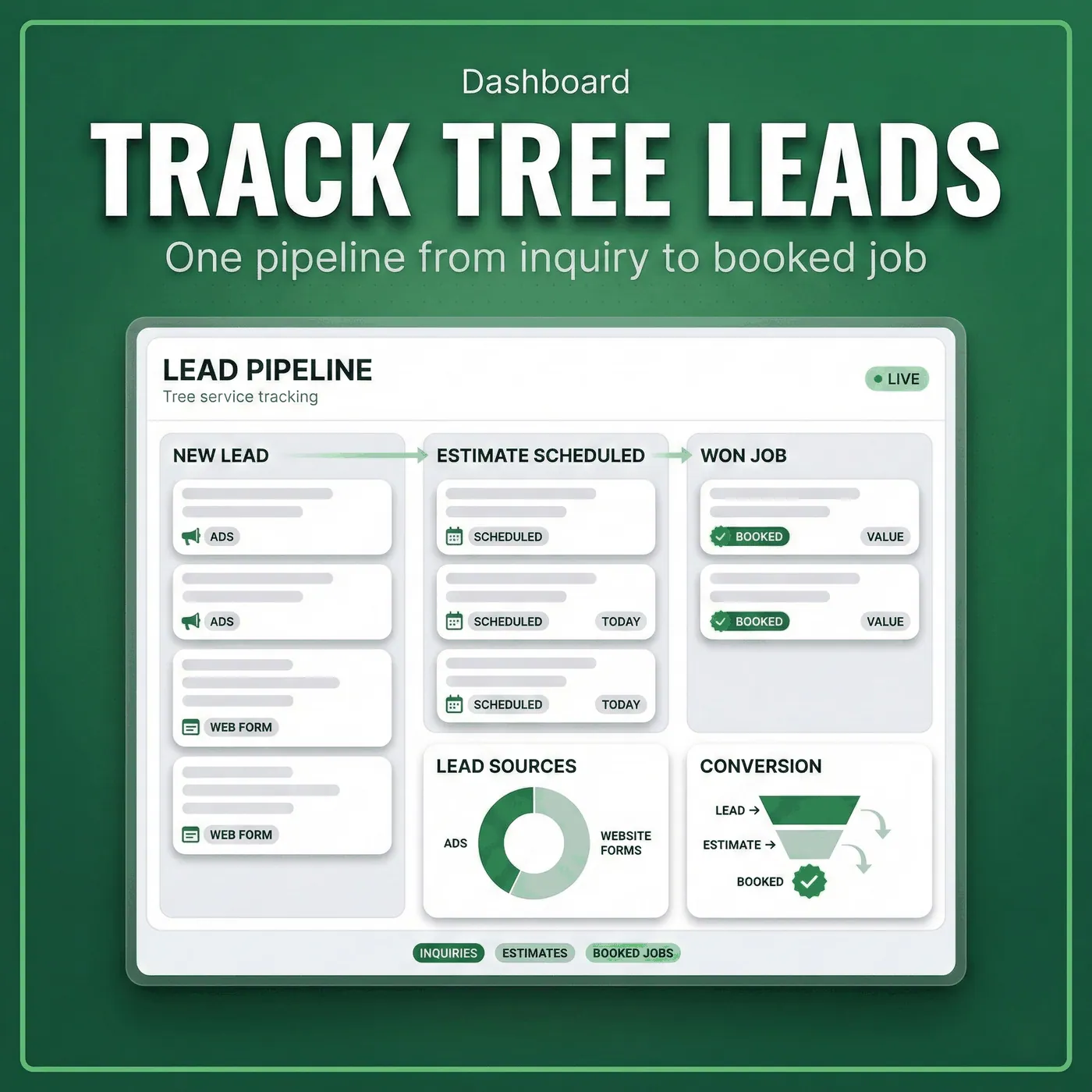
4. The minimum pipeline stages you should set up
Whatever tool you choose, configure the same core stages so you can measure reality:
- New lead
- Contacted
- Estimate scheduled
- Estimate sent
- Won
- Lost
- Follow-up needed
If you cannot see leads moving through these stages, you cannot optimize marketing or operations.
5. How to connect ads and directories to your CRM automatically
This is the simplest “2026 upgrade” most contractor businesses can make.
What to route automatically:
- Facebook/Instagram lead forms into your CRM (with the lead source tagged)
- Website forms into the same pipeline
- Calls into a logged lead record (at minimum: date, caller, service type, location)
Zapier’s Facebook Lead Ads integrations are designed for this type of workflow.
The goal is one source of truth for lead tracking.
6. A 7-day implementation plan
Day 1: Pick your system
- Jobber or Housecall Pro for most teams
- ServiceTitan if you are already operating at scale
Day 2: Build your pipeline stages
Use the seven stages above. Train your team to move every lead.
Day 3: Standardize intake questions
Service type, location, timeline, best call time, photo request.
Day 4: Connect your forms
Website form goes straight into your pipeline.
Day 5: Connect your ad leads
Route Facebook Lead Ads into the same pipeline using Zapier.
Day 6: Create follow-up rules
If no booking after:
- same day: one follow-up
- 48 hours: second follow-up
- 7 days: final check-in
Day 7: Start measuring booked jobs by source
This is where lead tracking turns into real marketing intelligence.
FAQs
Do I need a CRM if I’m small?
If you miss follow-ups or can’t tell where work came from, yes. Even a simple pipeline is better than inbox chaos.
Which tool is easiest to set up?
Jobber and Housecall Pro are commonly used by small service businesses and position themselves around core workflows like quoting and scheduling.
What if most leads come from phone calls?
Use call tracking or at least log every call as a lead record with outcome. Phone-only businesses still need pipeline discipline.
How do I stop losing leads?
Speed-to-lead, consistent follow-up, and a single pipeline that everyone uses.
Can I connect Facebook leads automatically?
Yes. Zapier offers Facebook Lead Ads integrations for routing leads into other apps and workflows.
What should I measure weekly?
Leads, contacted rate, estimates booked, close rate, and booked jobs by source.